 Aplas Docs
The AI assistant
Ask about your systems, and build the inventory in conversation
The assistant answers questions about your inventory and helps you build it. It reads what you actually have — not a general model of software estates — and everything it proposes to change arrives as something you confirm.
Open it from Assistant in the studio nav.
Asking questions
Type a question and the assistant answers from your inventory:
- How many applications do we have?
- Show me applications by team
- Which apps depend on each other?
When a view says it better than a paragraph would, one opens beside the conversation.
The assistant will not invent an asset you do not have. Asked about something absent, it says so and offers to search more broadly rather than making something up:
No asset named "Core Banking Platform" exists in your index. This could mean it hasn't been added yet, or it goes by a different name. Would you like to try a broader search?
Conversations are kept in the left rail and can be reopened. New conversation starts a fresh one.
Building in conversation
The assistant can also propose changes — a new view, an import, new assets. It never writes them itself. A proposal arrives as a card in the conversation, marked Proposed, with the result rendered beside it so you can see exactly what you would be keeping:
Applications by Business Criticality table Proposed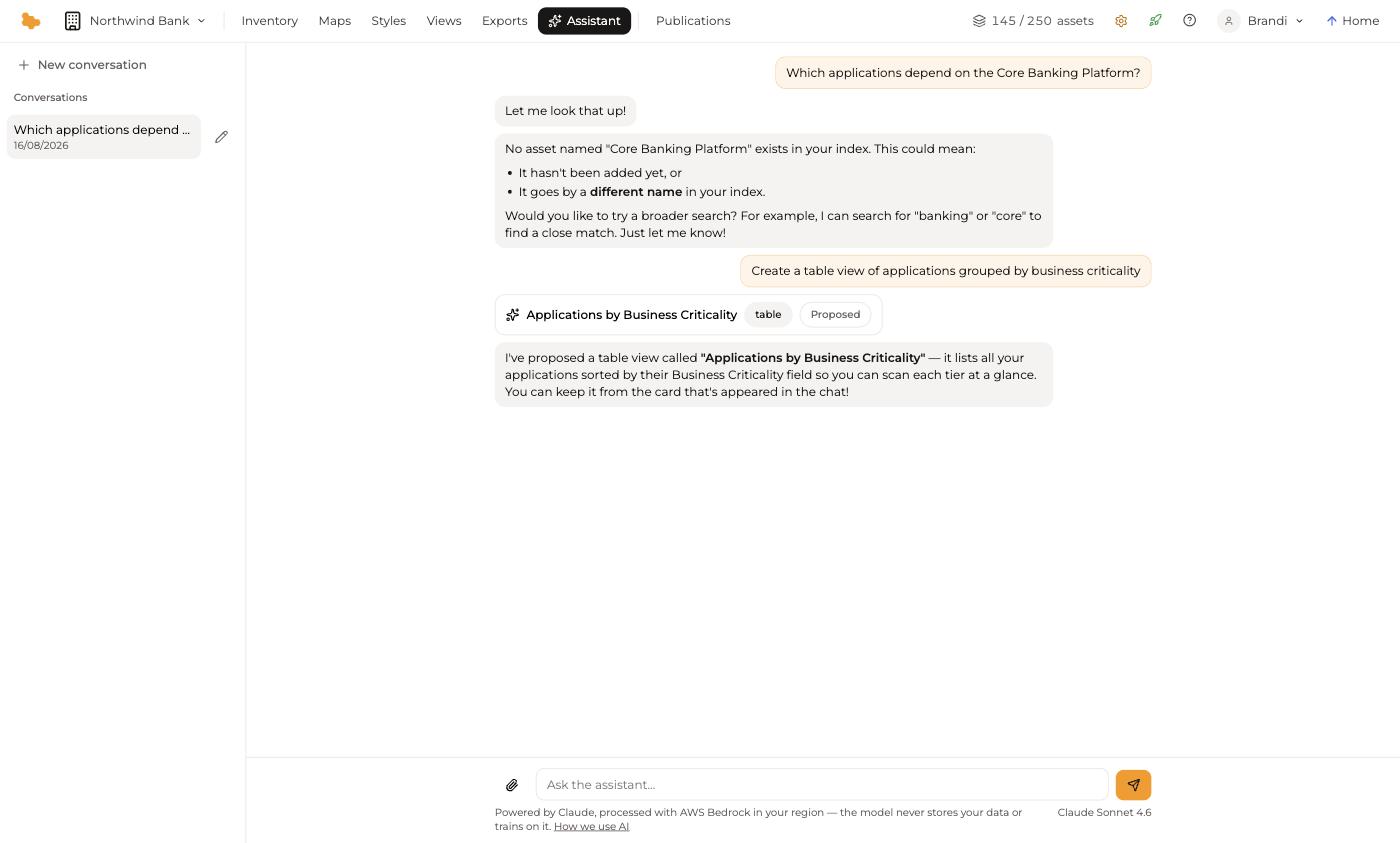
Nothing is saved until you keep it from that card. Discard it and the inventory is untouched.
This is the same trust boundary the import pipeline uses, and it is deliberate: AI proposes, you confirm.
Handing over a file
The paperclip beside the message box attaches a file. Dropping a spreadsheet into the conversation runs the same import pipeline described in Import — inference, then a proposal you review — with the assistant available to explain and adjust what it found. It is the door to use when your data is not a clean table, or when you would rather describe the problem than fill in a form.
Choosing a model
The model picker below the message box trades speed against depth. Each option shows what it costs relative to the others:
| Model | Credits | For |
|---|---|---|
| Claude Haiku | 0.25× | Fastest answers for quick questions |
| Claude Sonnet | 1× | The balanced default |
| Claude Opus | 4× | Deepest reasoning for the hardest questions |
Sonnet is the default and is the right choice for most work. Move up for a genuinely hard modelling question; move down for counting and lookups.
Privacy
The assistant runs on Claude, processed with AWS Bedrock in your organization's region. Your data is never stored by the model and never used to train it.
An administrator can turn AI features off for the whole organization under Configuration > Settings, which disables the assistant and the inference-backed import doors.