 Aplas Docs
Modelling Connections
How to record the connections in your estate — as assets, as relationships, or both
Aplas gives connections the same standing as the systems they connect. A connection can be a full asset in your inventory — with fields, an owner, and a lifecycle — or a single statement between two assets, added in seconds and free of inventory weight. Most estates use both, and every map view chooses which of them it draws.
This page is the modelling guide for that choice: which form to reach for, how each one behaves on the map, and how to change your mind later without rework.
Two ways to record a connection
- As an asset — create a record of a connectivity type, such as the built-in Integration. It gets a name, an owner, custom fields, a lifecycle and a place in your inventory, and because it is an asset it can itself appear in relationships — "routes via" a gateway, owned by a team.
- As a relationship — open either asset's Relations tab and add one: a verb between two assets, such as "depends on". A relationship is just the connection itself. It has no record of its own and doesn't add to your inventory. The verbs on offer are the workspace's relationship types, and you can add your own.
Both draw on the software map. A connectivity asset's records always draw as roads between the systems they connect. Relationships draw on any map view whose Relations layer is switched on — the toggle lives in Map Settings, where you also choose which relationship types that view shows.
To choose between them, ask one question: is there a piece of software doing the carrying? If you could name that software — a feed, a sync job, an API — create the asset and describe it. If the only name you can give the connection is its verb — "A depends on B", and there is nothing more to say — add a relationship.
The line between them is what you can say next. Only an asset can carry custom fields, an owner, or its own relationships. If you catch yourself wanting to tag a relationship or give it an owner, that is the sign it has earned a record. Many estates start as a dependency sketch drawn entirely with relationships, then promote the connections that turn out to deserve description — the sketch loses nothing in the meantime.
How far to go
Most estates need less structure than they expect. Model a connection in stages, and stop at the first stage that answers the question you actually have.
- Record the facts. A verb between two assets is already a complete statement. The second worked example below maps an entire event-driven estate without a single connectivity record.
- Make it an asset when it is a thing. If you can name the software doing the carrying, or you want fields, an owner or a lifecycle on the connection itself, give it a record of a connectivity type.
- List its steps when you need to see inside it. A connectivity record can hold an ordered list of the relationships that make it up — what calls what, in order — on its Composition tab.
- Stop. Each stage buys an answer and costs upkeep. If the next one would not change a question you can ask of the map, you have gone one stage further than the estate needs.
Connectivity assets
Any type you create can declare, in its type settings, that its records connect a source to a target. The type editor calls these connectivity assets, and the built-in Integration is simply the standard template's instance of the declaration — a feed type, a sync-job type, or an API type of your own works the same way.
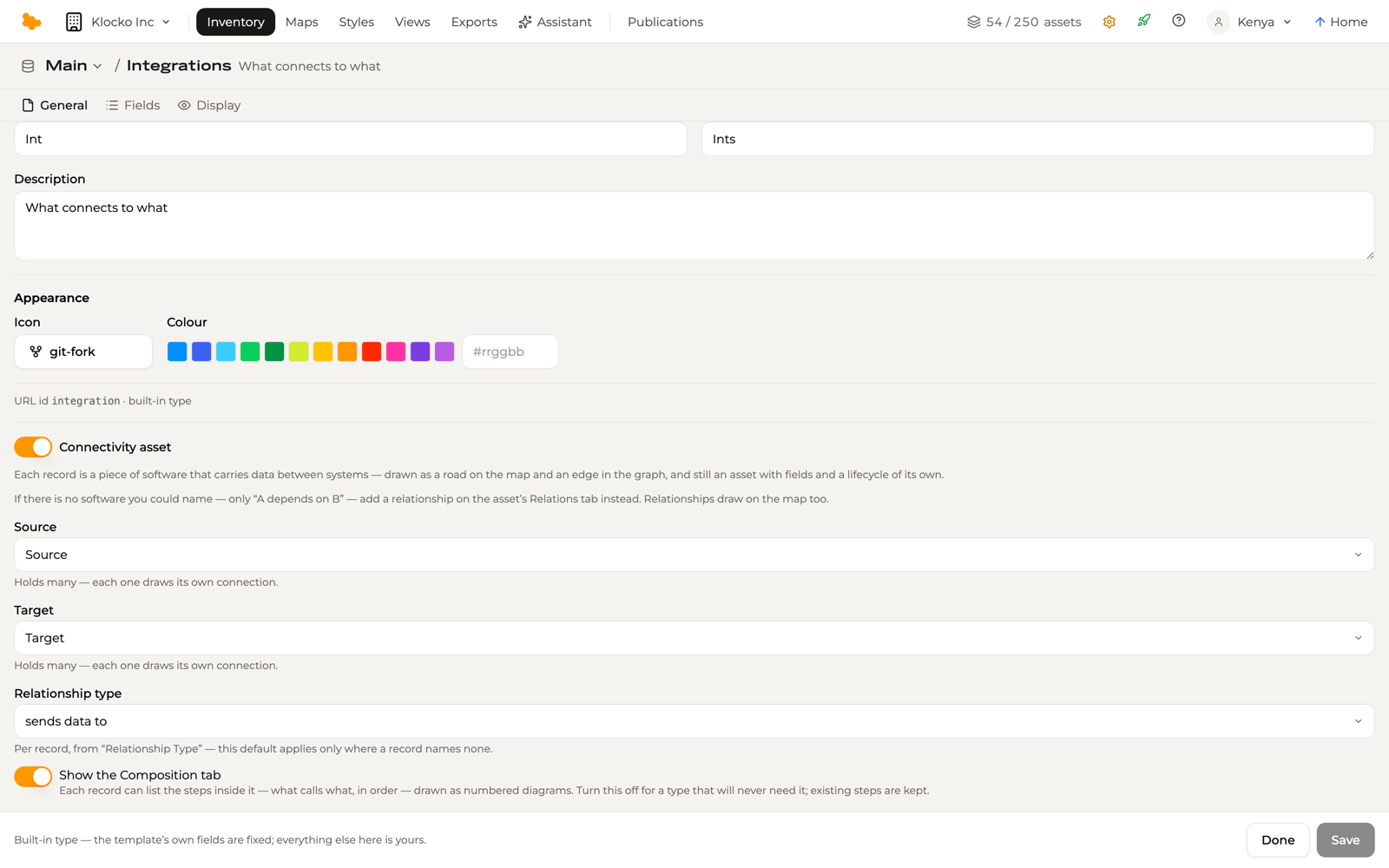
The name says the important half out loud: these records are still assets. They represent connectivity between systems rather than a system, but they keep everything asset-hood brings. Their source and target each hold one or more systems, so one piece of software that reads from several places, or writes to several, is one record — and the map draws a leg to each end.
Source and target are ordinary relation fields, and every relation field names what it is allowed to point at. A field can point at one asset type, at several, at any type at all, or at your relationship types rather than at assets. The field editor calls this setting Points at and it holds as many types as you name at once, while Any asset type and Relationship types (registry) each stand alone — choosing either replaces whatever the field named before. Naming the types a field is for is worth the moment it takes: the picker then offers those assets and nothing else, and a value from outside the set is refused rather than quietly stored.
Composition
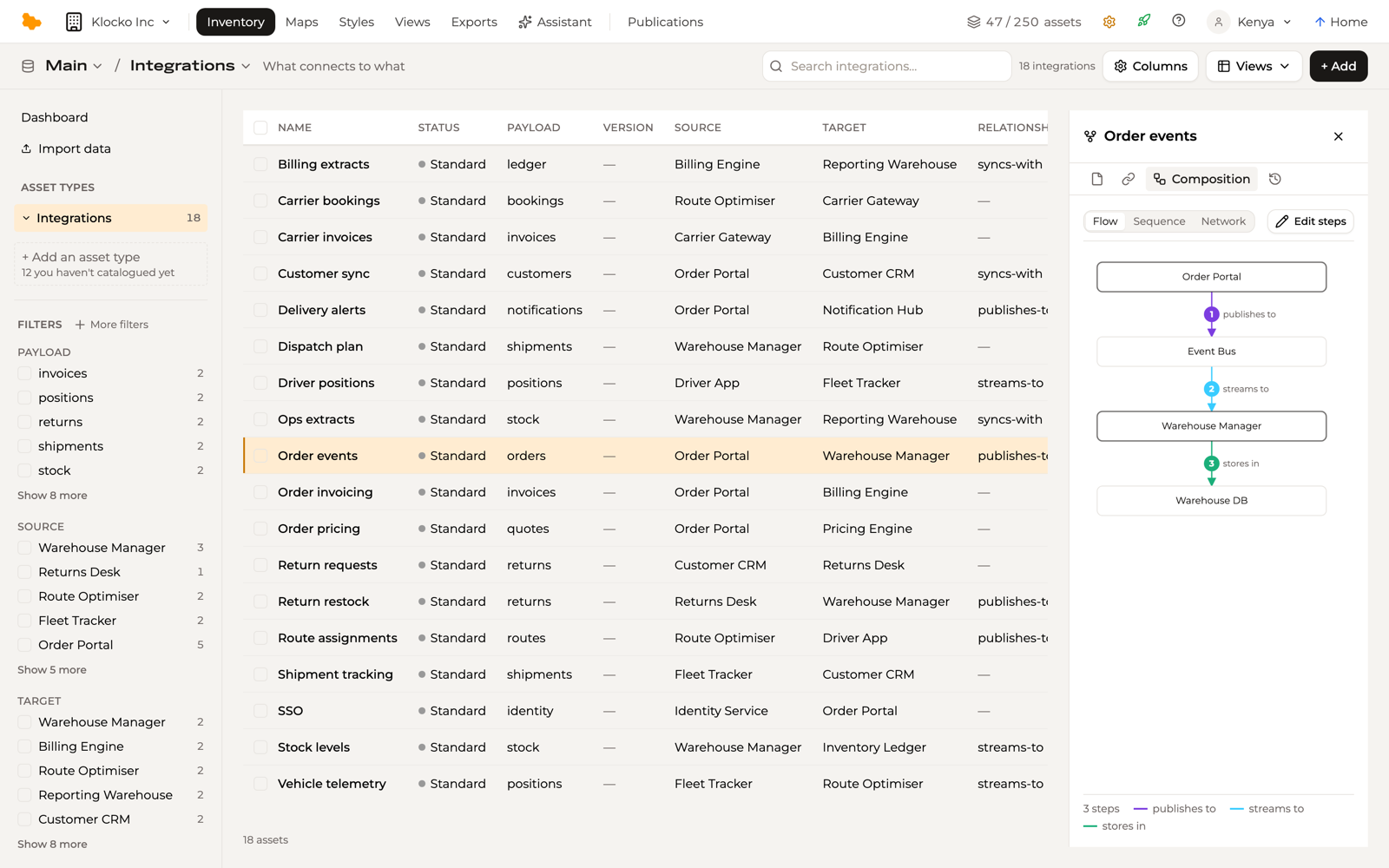
A connectivity record says which systems it connects. Its Composition tab says what happens inside it: the ordered list of relationships that make the connection up.
Each entry is a step, described the way you would say it out loud — from one asset, a verb, to another. The verb can stay Unspecified when the step is simply a hop between the two. Steps are described rather than picked from a list, and Aplas reuses the relationship you describe: the same "publishes to" between a service and a queue can be step 2 of one flow and step 3 of another, recorded once and shared by both.
The tab draws the steps three ways — a numbered flow, a sequence, and a network. All three read from the same list, so they always agree. Each step is coloured by its verb's relationship type, so a chain that changes verb mid-way shows it.
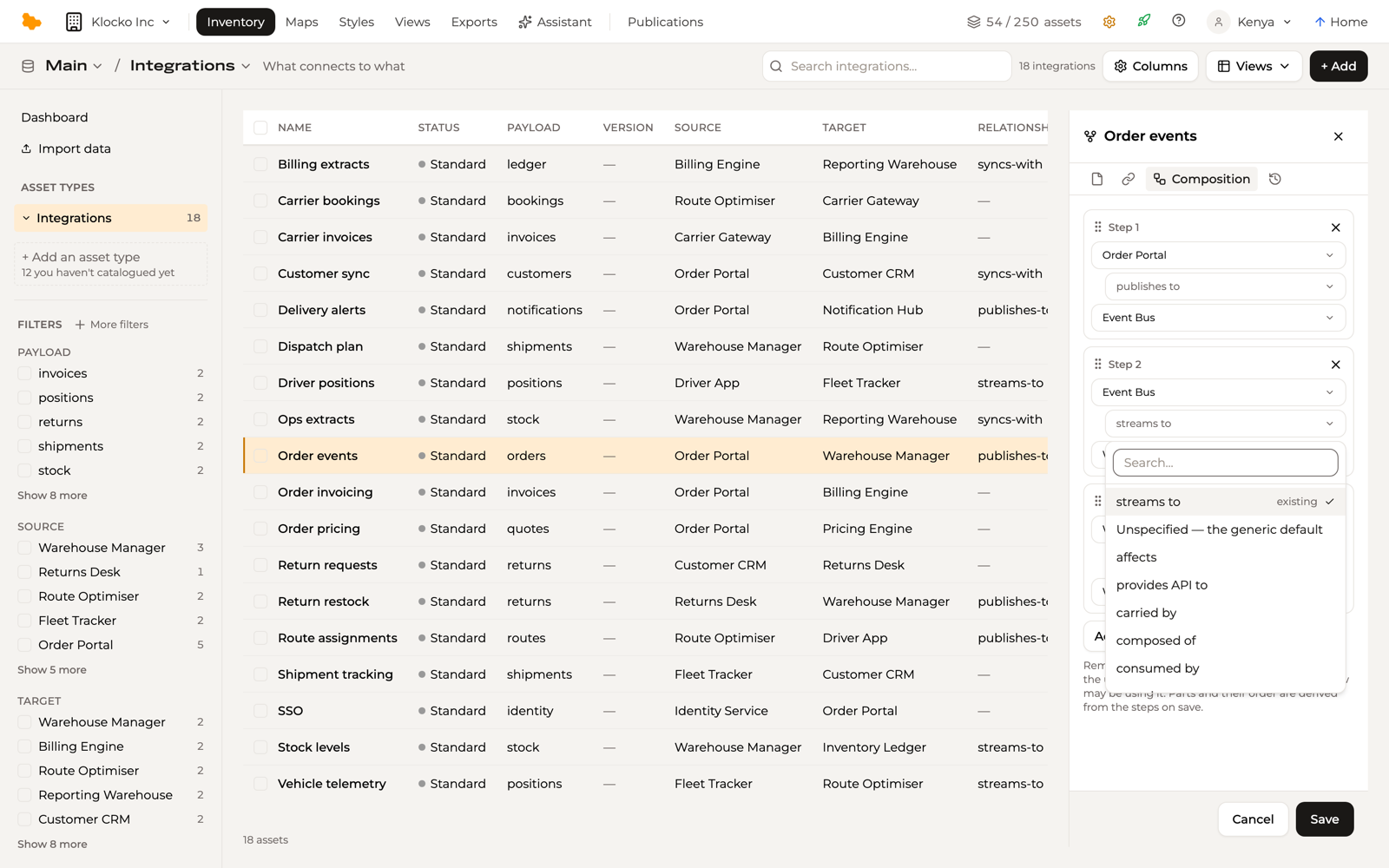
Edit steps opens the list as rows — from, verb, to — with Add step pre-filling the next row's start from the last row's end, so a chain types out in order. The verb picker offers the relationships that already exist between the chosen pair first, marked as existing, so reuse is visible before it happens. Drag a row's handle to reorder it. A record with no steps yet offers Add steps in the tab's place, opening the editor on one blank row that starts from the connection's own source.
Everything else follows from the steps rather than being recorded again:
- The parts are derived. Every asset the steps pass through, other than the connection's own two ends, appears on the record's Relations tab as "runs through". Open one of those assets and it answers from its own side, as "run through by" — so a gateway's page lists the connections running through it without anyone recording that a second time.
- The ends stay your claim. Source and target say what the connection joins, and listing steps never rewrites them. A chain of steps need not literally touch either end; the connection is still the claim you made about it.
- Editing steps never deletes a relationship. Removing a step takes it out of this connection's list and leaves the relationship itself untouched. Relationships are deleted from the Relations tab, and nowhere else.
The tab is shown by default on every connectivity type. Turn it off in type settings with Show the Composition tab for a type that will never need it — existing steps are kept either way.
Steps travel to the map too. Click a road in a map view and its inspector lists them, in the builder and in a published view alike.
Roads, not places
On a software map, applications and systems are the cities and towns. Connectivity assets are the roads between them — so the map does not draw one as a place. It draws what the record connects.
Several sources feeding one target draw as legs of the same road — on-ramps joining one route, not four roads meeting at a town. And when a view does want to inspect the records themselves, drawing them as places is a per-view display choice in that view's settings; the model underneath doesn't change, and every other view keeps its roads.
Relationships share the same geometry: a verb between two placed assets draws as a road on any view whose Relations layer includes its relationship type. Where an asset-drawn road and a relationship connect the same pair, the map draws one road and its inspector lists everything travelling it — the records and the statements together.
The hub rule
Estates are full of software that everything passes through — gateways, brokers, buses, queues. The rule for whether such a hop belongs on the map as a system: a hop is a system when it holds data at rest or enforces policy. "At rest" means the data lives there — a buffer holding payloads mid-flight is still data in transit. Pass-through software is a road; a hop that stores or decides is a place.
Worked example: an API gateway
Every request in an estate flows through one API gateway, so it is tempting to model the gateway as the connection — one record wired to everything. Model it the other way around:
- The gateway is an application. It enforces policy — authentication, routing, rate limits — and that is the hub rule.
- Each logical path through the gateway is its own connectivity record, end to end. The orders service calling inventory is one record: source orders, target inventory — the gateway is not one of its endpoints.
- Record the gateway's involvement as a relationship. Add "routes via" from each path record to the gateway. Connectivity records are assets, so they can appear in relationships — exactly the detail a bare statement could not have carried.
The shape to avoid is one record named after the gateway with every caller as a source and every service as a target. Multiple sources and targets on one record mean every source connects to every target — that record claims the whole cross product, most of which isn't real, and the map will faithfully draw connections that don't exist.
Nothing in the type editor stops you. When a type declares its source and target, the pickers offer the type's relation fields — a "routes via" field pointing at gateways among them — so declaring the gateway an end is one wrong selection away. The rule above is what stands between you and a record asserting that every caller talks to every service.
When you want the hub-and-spoke picture, it is a view choice rather than a modelling one: scope a map view's Relations layer to "routes via" and the spokes draw; or have a view draw the path records as places when the paths themselves are under discussion.
Worked example: an estate with no connectivity assets at all
A dependency map needs no records. One team mapped their event-driven estate entirely with relationships, in two layers:
- Infrastructure verbs on the physical hops — "publishes to" and "consumes from", between each service and the message queue.
- Business verbs on the logical flows — "sends orders to", between the two services that actually exchange orders.
The second layer has to be recorded in its own right — it cannot be derived from the first. That is not a limitation of the model; it is what a queue is for: once several flows share a topic, which consumer reads whose messages is knowledge only the team holds. Record it, or no map can show it.
It is fair to ask whether keeping both layers is duplication. It isn't. They are independent claims that happen to describe the same estate: the infrastructure layer says what is wired to what, and the business layer says who serves whom — and stays true when the wiring is replaced. Neither implies the other, in either direction. And the argument generalises past queues: any extra input that would make the derivation reliable is precisely the fact you would have had to record anyway.
With both layers recorded, one map view scopes its Relations layer to the infrastructure verbs (what is physically connected), another to the business verbs (who serves whom) — the same estate answering two different questions. The day one of those flows deserves fields or an owner, promote that single relationship to a connectivity record and leave the rest as they are.
Model the problem, not the build
One test keeps a connection model honest over time: if you rebuilt the connection with a different technology, would your model change? The logical fact — orders flow from this system to that one — outlives every implementation of it. Describe the connection the business would recognise, put the technology in its fields, and the map stays true through every re-platforming.